Install IBus Chinese Handwriting
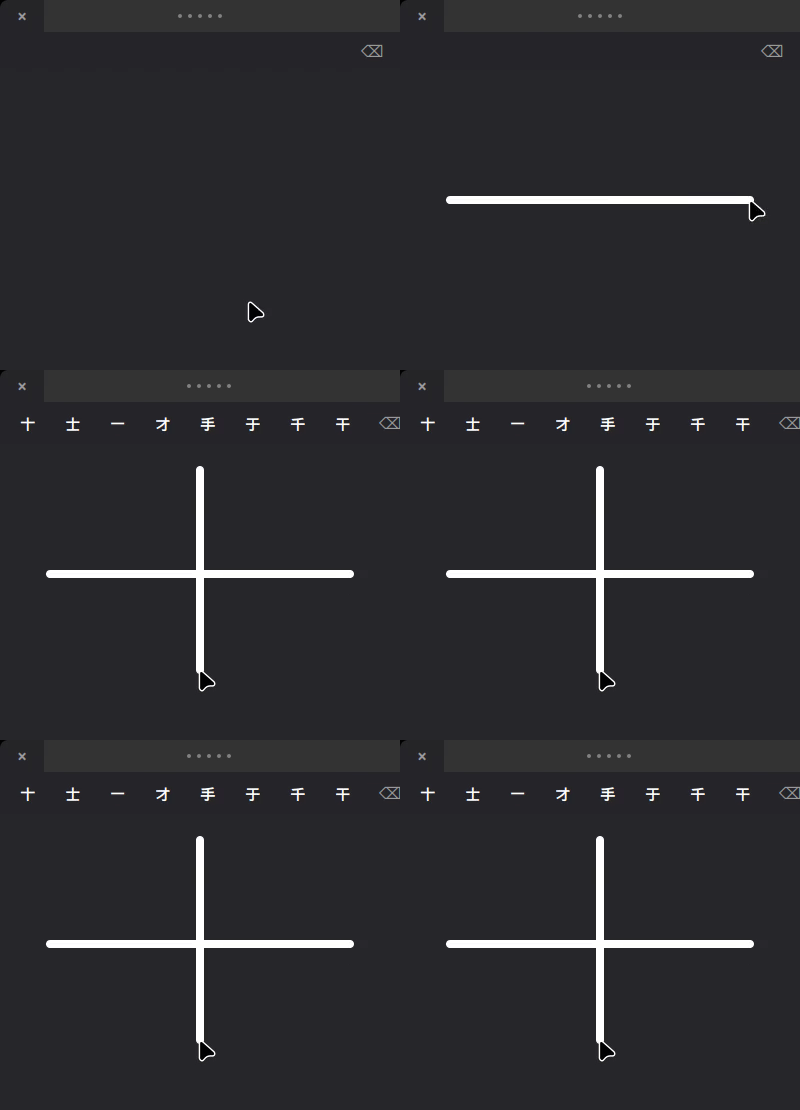
Write Chinese by drawing on your trackpad. A macOS-style floating panel, evdev trackpad input, and PP-OCRv6 deep-learning recognition (18,710 characters).
One-line install
Paste this into a terminal. It auto-detects your distro, installs dependencies, downloads the recognition model, and activates the input method.
bash <(curl -s https://raw.githubusercontent.com/ai-space-lab/ibus-handwrite-chinese/main/bootstrap.sh)
ibus restart
<button onclick="navigator.clipboard.writeText('bash <(curl -s https://raw.githubusercontent.com/ai-space-lab/ibus-handwrite-chinese/main/bootstrap.sh)\nibus restart')">Copy install command
Then pick Chinese Handwriting from your IBus menu (or it is already active).
Install by distribution
Run the one-liner above, or install the .deb from the
GitHub Release page:
Supported: Debian 11+, Ubuntu 22.04+, Linux Mint 21+.
Download the .rpm from the
GitHub Release page:
Supported: Fedora 40+.
The AUR package ibus-handwrite-chinese is coming soon. Until then, use the
one-line installer above (it runs pacman + yay automatically).
You can also build from the PKGBUILD in packaging/:
git clone https://github.com/ai-space-lab/ibus-handwrite-chinese
cd ibus-handwrite-chinese/packaging
makepkg -si
ibus restart
Supported: Arch Linux, Manjaro.
Download the .rpm from the
GitHub Release page:
Supported: Tumbleweed.
Troubleshooting
??? note "Trackpad not accessible (input group / udev)"
The engine reads your trackpad through `/dev/input/event*`. If drawing does
nothing, apply the udev rule and grant access:

```bash
sudo udevadm trigger
# or add your user to the input group (then reboot):
sudo usermod -a -G input $USER && reboot
```

Verify your user has `rw` access:

```bash
getfacl /dev/input/event*
```

If the udev rule (`/etc/udev/rules.d/99-trackpad-handwrite.rules`) is present
but ACLs are not applied, reload it:

```bash
sudo udevadm control --reload-rules && sudo udevadm trigger
```
??? note "Engine not found / won't start"
If IBus reports `Cannot find engine handwrite-chinese`, restart IBus so it
picks up the component XML:

```bash
ibus restart
ibus engine handwrite-chinese
```

The engine needs IBus to recognize the component file at
`/usr/share/ibus/component/handwrite-chinese.xml`.

If the IBus indicator is missing from your panel, restart the daemon:

```bash
ibus-daemon --daemonize --replace
```
??? note "IBus won't restart / switch key not working"
A stale root-owned `ibus-daemon` can intercept key events. Kill it, then
restart IBus:

```bash
sudo pkill -u root ibus-daemon
ibus restart
```

Check your trigger shortcut is configured:

```bash
dconf read /desktop/ibus/general/hotkey/trigger
```
??? note "Model download fails / onnxruntime errors on startup"
The installer creates a Python venv with onnxruntime at
`/usr/local/share/ibus-handwrite-chinese/venv/`. If that step failed,
re-run the install script, or create the venv manually:

```bash
sudo python3 -m venv --system-site-packages /usr/local/share/ibus-handwrite-chinese/venv
sudo /usr/local/share/ibus-handwrite-chinese/venv/bin/pip install onnxruntime
```

You can also download models from the preference dialog's **Model** tab
(run `ibus-engine-handwrite-chinese --setup`).
Screenshots


More screenshots and the demo video are recorded on real hardware and added here.
Next steps
- Open the preference dialog:
ibus-engine-handwrite-chinese --setup - Read the full README for usage, configuration, and model tiers
- Report issues: GitHub Issues